Inside a QR Code: How Squares Carry a Message
Inside a QR code, learn how finder patterns, data encoding and error correction turn a camera image into readable content, and why masking is not encryption.
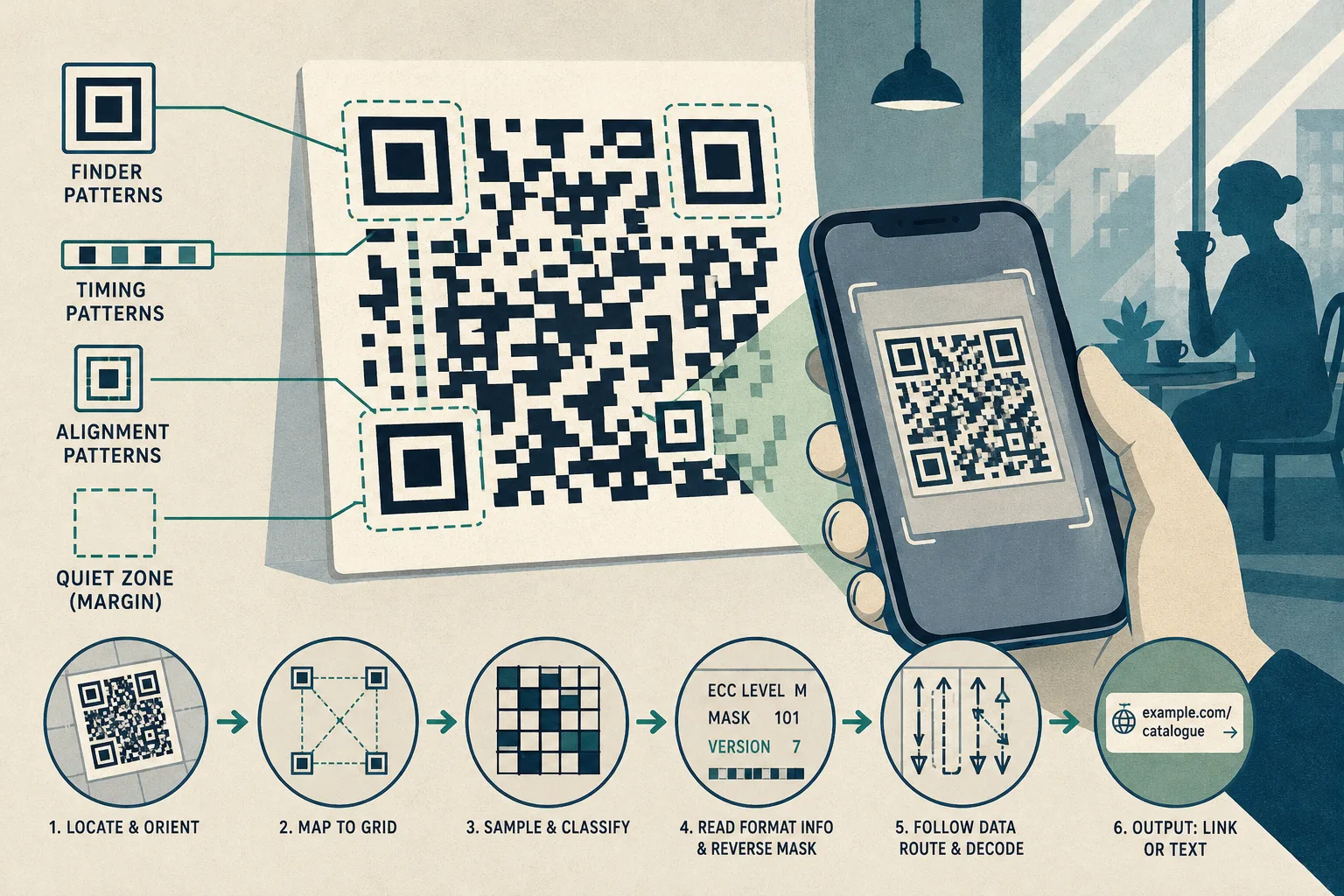
The most common mistake with a QR code is treating every dark square as part of its message. That obscures the work done by the large corner targets and other structural features, which help a scanner locate and interpret the grid before it can recover the encoded content.
Finder patterns locate the symbol
A QR code is a square grid of small units called modules, each displayed as dark or light. A phone camera may see it tilted, blurred, poorly lit or printed against a busy background. The scanner first has to locate the symbol and estimate its orientation.
The three large square targets near three corners are finder patterns. Their nested dark and light rings stand out from ordinary parts of the code. A scanner uses their positions and shapes to identify the symbol and establish its orientation.
Alternating dark and light timing patterns run between the finder patterns and help establish the spacing of the grid. Larger QR codes also include alignment patterns, which help a decoder account for distortion across the image. These features organise the symbol; they are not pieces of its message.
The remaining corner has no finder pattern. A clear margin, called the quiet zone, normally surrounds the code and separates it from nearby printing. That margin is not encoded data, though it helps distinguish the symbol from its surroundings.
A scanner maps the image onto modules
Imagine a café has printed a QR code on a menu beside a reflective window. A customer points a phone at it from an angle. Glare may obscure part of the pattern, while perspective makes the square look skewed. The scanner can begin by locating the finder patterns.
Once it finds the symbol, the software estimates its geometry and maps the photographed shape back onto a square grid. It uses structural features to estimate module positions, then classifies sampled areas as dark or light. Shadows, blur and printing defects can make that classification uncertain.
The code also contains format information. This records the error-correction level and mask pattern used. Larger QR codes include version information that identifies the grid size. A decoder uses these details to interpret the other modules.
Data follows a defined route through the grid
After structural areas are set aside, the remaining modules represent encoded data and error-correction information. The decoder does not read them in ordinary left-to-right rows. It follows a defined route through pairs of columns, alternating direction and skipping modules reserved for structural features.
The encoded stream includes mode information that indicates how its content is represented. QR codes support numeric and alphanumeric modes, among others, and byte mode for broader data. The stream also carries information such as a character count. A short web address and a longer text string can therefore produce different patterns.
A QR code commonly stores a URL, not the website itself. It can also hold plain text or other supported content. Decoding reveals the stored payload; opening a link or displaying text is a separate action handled by the phone or scanning app.
Error correction can help recover damaged data
QR codes use Reed–Solomon error-correction coding. In broad terms, the encoded data includes redundancy that can help recover information when some of the symbol is damaged or misread. It cannot repair every problem: severe blur, extensive damage or harm to important structural features can prevent a scanner from reading the code.
How much damage can be handled depends on the error-correction level and which modules are affected. A logo placed over the centre is not automatically harmless. That area may contain data, and recovery depends on the particular code and the extent and location of the obstruction.
Masking changes the pattern, not the message
When a QR code is made, one of several defined mask patterns is applied to its data area. The masking rules help avoid visual arrangements that could make detection or sampling less reliable, such as long runs of one colour or patterns resembling finder features.
Masking is reversible, not encryption. Format information identifies the mask, allowing a compatible decoder to undo its effect while extracting the data. The squares are not a place to store a secret: anyone with a compatible scanner can read the content.
What do readers ask about QR codes?
Can a QR code be read upside down?
Often, yes. Finder patterns help a scanner determine orientation after rotation, provided the image is clear enough for the scanner to locate the symbol.
Why can a damaged QR code still scan?
Error-correction data can help recover information when some modules are obscured or misread. If too much information is lost, or the grid cannot be located, decoding can fail.
Does a QR code contain a whole website?
Usually it contains a URL rather than the website itself. A phone may offer to open that address, while a code containing plain text can display the text directly.
Are QR code squares encrypted?
No. Masking changes the visible arrangement but does not provide secrecy. Treat the content as readable by anyone who scans the code.
How can you trace what a scanner is doing?
Say a library prints a QR code on a shelf label linking to a catalogue entry. The starting inputs in this invented situation are one printed code, a phone camera and the expected catalogue address. The scanner locates the finder patterns, estimates the grid from its structural features, reads format information, reverses the mask and decodes the data, applying error correction if needed. The expected observable output is the catalogue address on screen or a prompt to open it. If the displayed address differs from the expected one, the decision is to stop and ask the library to confirm the code.
For a close visual inspection, use a printed code or an image viewer with enough zoom to see individual modules. Each observation points to a practical choice:
- Check the three corner finder patterns. If all are visible and distinct, continue inspecting the grid; if one is obscured, move the camera or use a clearer copy.
- Check the margin around the code. If a clear quiet zone separates it from nearby printing, try a scan; if not, crop or reprint it with a clear border.
- Check the alternating timing pattern between finder areas. If its rhythm is visible, continue inspecting the grid; if it is damaged, use a cleaner image rather than estimating module positions.
- Check whether a larger code has a visible alignment pattern. If it is intact, try scanning from the current view; if it is obscured, use a straighter view or a better copy.
- Check whether glare, blur or a logo covers modules. If the pattern remains clear, try a scan; if not, remove the obstruction or obtain an unobstructed version.
- Check the content displayed by the scanner before opening it. If it matches the expected URL or text, decide whether to proceed; if it is unexpected, do not follow the link and ask the source to confirm it.
A QR code’s message is only one layer of its design. Finder patterns locate the symbol, timing and alignment features define its grid, format information guides interpretation, and redundant data can help repair limited damage. When tracing how a QR code works, distinguish the visible pattern from the structured information a scanner uses to read it.